7 Powerful Ways Small Businesses Can Use Claude Right Now
You've probably heard of Claude. Maybe you've even had a conversation with it. But if you're using it the same way you use Google. First, you type a question, read an answer, and close the tab. Do you know you're leaving most of its power on the table?
SMALL BUSINESS SOLUTIONSSYSTEMS
Dez
6/19/20268 min read
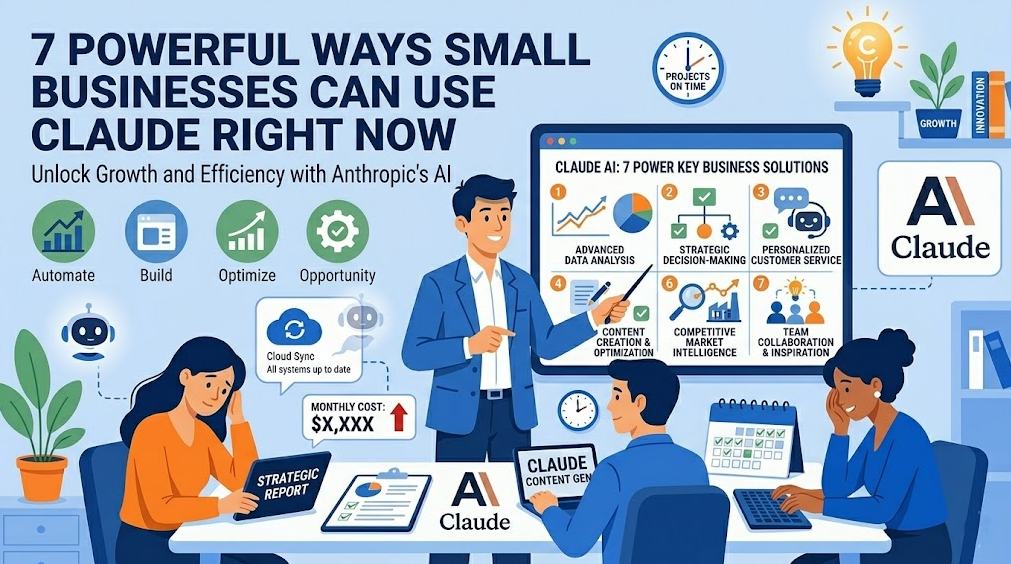

Claude isn't just a chatbot. It's a full ecosystem of AI tools built for real work: drafting, researching, building, automating, and executing tasks from start to finish. And a growing suite of those tools are designed specifically with small businesses in mind.
This article breaks down seven practical ways to use Claude in your business. It includes two game-changers that most people haven't heard of yet.
What Is Claude?
Claude is an AI assistant built by Anthropic, designed to be helpful, harmless, and honest. It's available on the web, desktop, and mobile, and it works across writing, research, analysis, coding, and multi-step task execution.
What makes Claude different from a basic AI chatbot is its ability to act, not just respond. Depending on which Claude tool you use, it can read your files, connect to your business software, execute multi-step workflows, and build custom tools for your specific needs, all while keeping you in control at every step.
Here are seven ways to put it to work.
1. Claude Chat: Your Always-Available Business Assistant
Best for: Everyday tasks, writing, research, strategy, and problem-solving.
The most accessible place to start is claude.ai. Claude's core chat interface, available on web, desktop, iOS, and Android.
Think of Claude Chat as having an MBA-level assistant available 24/7, one who never gets tired, never bills by the hour, and can switch from drafting a client proposal to analyzing a competitor's strategy to writing a job description without missing a beat.
Practical use cases:
Draft professional emails, proposals, and customer responses in your brand voice
Summarize lengthy contracts, reports, or industry articles
Brainstorm marketing ideas, pricing strategies, or product names
Prepare for difficult conversations with clients, staff, or vendors
Create SOPs (Standard Operating Procedures) from your own rough notes
Translate content into plain language your customers will actually understand
Small business example: A salon owner pastes in a negative Google review and asks Claude to help craft a professional, empathetic public response that addresses the complaint without being defensive. What used to take 20 minutes of agonizing word choice takes 60 seconds.
2. Claude Projects: Your AI With Memory
Best for: Ongoing work, recurring clients, team knowledge bases, and long-running projects.
Standard AI chats have no memory, so every conversation starts fresh. Claude Projects solves this.
Projects let you upload documents, set custom instructions, and maintain context across multiple sessions. Claude "remembers" your business, your tone, your clients, and your preferences, so you don't have to re-explain yourself every time.
Practical use cases:
Upload your brand guidelines and have Claude write consistently in your voice across all content
Create a client project that holds meeting notes, proposals, and communication history
Build a team knowledge base that all employees can query in plain English
Store your service packages, pricing, and FAQs so Claude can draft accurate responses instantly
Maintain a running context for ongoing marketing campaigns
Small business example: A marketing consultant creates a Project for each client, uploading their brand guide, past campaign results, and target audience profile. Every piece of content Claude generates is on-brand from day one, no back-and-forth briefing required.
3. Claude Research: Deep Dives Without the Hours
Best for: Market research, competitor analysis, trend tracking, and due diligence.
Claude's Research mode goes beyond a single-turn answer. It combines extended reasoning with live web search to plan a research approach, gather information from multiple sources, cross-reference findings, and produce a structured report, all in one task.
This is the equivalent of hiring a research analyst to spend half a day on a topic and hand you a polished brief. It happens in minutes.
Practical use cases:
Research a new market before expanding your services into it
Analyze your top three competitors' pricing, positioning, and customer reviews
Track industry trends and summarize what's changing in your space
Vet a potential vendor, partner, or contractor before signing
Research regulatory or legal changes that might affect your business
Small business example: A small logistics company uses Claude Research to pull together a competitive analysis of three rival courier services, including pricing models, service areas, customer sentiment from reviews, and recent news before you go on a strategy meeting. What would have taken a team member a full day is ready in 15 minutes.
4. Claude Cowork: Your AI That Actually Does the Work
Best for: Multi-step tasks involving your files, apps, and desktop, without writing a single line of code.
This is where Claude stops being a conversation partner and starts being a worker.
Claude Cowork is a desktop tool (available in the Claude desktop app on Pro and Max plans) that gives Claude access to the files and folders you specify on your computer. Instead of telling you how to do something, Cowork does it for you, including reading documents, editing files, searching the web, and completing multi-step tasks from start to finish.
Before it takes any significant action, Claude shows you the plan and waits for your approval. You stay in control. It handles the execution.
A lot of knowledge work is "glue work". From finding the right files, reformatting them, copying numbers between a PDF and a spreadsheet, to assembling a deck from notes. Cowork automates the glue, not just the thinking.
Practical use cases:
Drop a folder of receipt photos and have Claude build an expense report
Point Claude at a folder of raw notes and get a formatted client report
Reorganize and rename a disorganized file system with a plain-language instruction
Pull data from multiple documents and consolidate it into a single summary
Set up recurring tasks so Claude handles them automatically on a schedule
Small business example: A freelance photographer drops a folder of 30 event photos alongside a client brief into Cowork. Claude selects the best shots by description, renames files to a standardized format, writes captions for each image, and generates a delivery summary. Such a task would have taken two hours of manual work.
Where to find it: Open the Claude desktop app. You'll see Chat, Code, and Cowork side by side. Switch to Cowork when you want Claude to execute tasks rather than just respond.
5. Claude for Small Business: Your Operations Assistant, Built In
Best for: Finance, sales, marketing, HR, and customer service workflows connected to your existing tools.
This one is a game-changer specifically for small business owners.
Claude for Small Business is a toggle install that puts Claude to work inside the tools small business owners already use: Intuit QuickBooks, PayPal, HubSpot, Canva, DocuSign, Google Workspace, and Microsoft 365.
It runs inside Claude Cowork and ships with 15 ready-to-run agentic workflows. This means that Claude doesn't just advise you on what to do; it does it, then waits for your approval before anything sends, posts, or pays.
Each connected tool handles a specific job: PayPal powers settlements, invoicing, disputes, and refunds inside Claude. Intuit QuickBooks handles payroll planning, the monthly close, cash flow, tax season prep, and reconciliation. HubSpot runs lead triage, customer pulse, and campaign attribution. Canva generates content for every channel. DocuSign sends contracts out for signature, tracks status, and files the executed copy back where it belongs.
Practical use cases:
Finance: Settle your QuickBooks cash position against incoming PayPal transactions, forecast the next 30 days, and queue overdue payment reminders for your approval
Sales: Triage new HubSpot leads, score them by urgency, and draft personalized follow-up emails that are ready to review before sending
Marketing: Generate a week of social content via Canva, schedule it, and track performance; and all of this is done in one workflow
Contracts: Draft a client agreement, send it for signature via DocuSign, and file the executed copy automatically
HR: Prepare payroll planning scenarios, flag discrepancies, and surface what needs your attention
Small business example: A boutique consulting firm connects HubSpot, QuickBooks, and DocuSign. On Monday morning, Claude surfaces new leads, drafts follow-up emails, flags an overdue invoice, and has a contract ready for a new client, before the owner has finished their first coffee.
How to get started: Install the Claude desktop app, toggle on Claude for Small Business inside Cowork, and connect the tools you already use.
6. Claude Code: Custom AI Tools Built for Your Business
Best for: Business owners who want custom-built automations, tools, and apps, even with no technical background.
Claude Code is Anthropic's command-line coding assistant, designed primarily for developers. But here's why it matters for small business owners: it's the engine behind building tools that don't exist yet. The tools that are built specifically for your workflows, your data, and your problems.
Companies report using Claude Code to build specialized tools like AI labeling systems, ROI calculators, and automated customer service solutions that previously would have required dedicated development teams.
You don't need to be a developer to benefit from Claude Code. If you have someone who can translate your business problem into a brief, then Claude Code can build the solution.
Practical use cases:
Build a custom intake form that automatically categorizes leads and triggers follow-up emails
Create an internal pricing calculator that applies your rules and margins automatically
Automate the generation of monthly client performance reports from raw data
Build a client-facing ROI calculator for your website that captures leads
Develop a custom workflow that connects tools that don't have a native integration
Small business example: A digital marketing agency needs a monthly reporting tool that pulls data from three different platforms and formats it into a branded PDF automatically. Claude Code builds it in an afternoon — a project that would have cost thousands with a developer and weeks of back-and-forth.
Best approach for non-developers: Bring in a consultant to scope and build with Claude Code. Then own and run the output yourself.
7. Claude in Chrome: Your AI in the Browser
Best for: Research-while-working, content from web pages, and automated browser-based tasks
Claude in Chrome is a browser extension that puts Claude directly inside your browsing experience. It can read the page you're on, take actions in the browser, and help you work without switching between tabs and windows.
Paired with Cowork, it becomes even more powerful. Claude can use Google Chrome to do web research as part of a multi-step desktop task, without you needing to switch windows at all.
Practical use cases:
Highlight text on any webpage and have Claude instantly summarize, explain, or rewrite it
Ask Claude to research a topic by browsing multiple pages and reporting back
Automatically fill out forms or extract data from websites
Get Claude's analysis of a competitor's website or pricing page while you're looking at it
Draft a response to a LinkedIn message or email without leaving the page
Small business example: A business development manager visits a prospect's website before a call. With Claude in Chrome, they get an instant company summary, likely pain points, conversation starters, and a suggested pitch angle — all before they dial in.
Which Claude Tool Is Right for You?
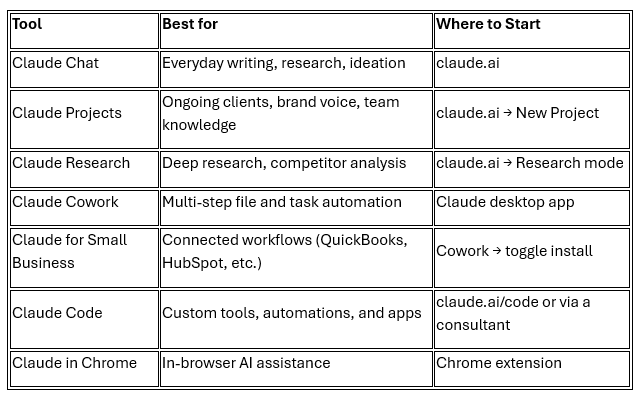

The Smartest Starting Point
You don't need to implement all seven at once. The highest-impact starting point for most small business owners is:
Start using Claude Chat daily for writing and communication tasks
Set up a Claude Project for your business so it knows your brand and services
Install Claude Cowork and run one file-based task this week
Explore Claude for Small Business if you're already using QuickBooks, HubSpot, or PayPal
From there, the efficiency gains compound quickly, and you'll start to see where a custom Claude Code build would save you the most time.
Not Sure Where to Start?
That's exactly what we help with at DEZPB Digital.
We work with small business owners to assess where AI can make the biggest difference, choose the right tools, and implement them in a way that fits how your business actually runs. No jargon, no overwhelm. Just a clear, practical plan.
👉 Book a Free AI Readiness Consultation →
Or reach out at hello@dezpbdigital.com
DEZPB Digital helps small businesses harness AI and automation to work smarter, grow faster, and compete with confidence.
Lets Connect
© 2026 Digital.DEZPB.COM. All rights reserved.